
 |
Google Chrome browser is the latest entry into the ongoing web browsers war which is mainly ruled by IE and Firefox. Like other browsers Chrome also has built-in login password manager functionality which keeps track of the login secrets of all visited websites. |
ChromePasswordDecryptor is the tool which makes it easy to decrypt these login secrets for all the websites stored by Chrome. It automatically detect the default chrome profile path for the current user and displays all the stored login credentials in clear text after decrypting them. It also shows all the blacklisted website entries for which user has prompted Chrome to not to remember the passwords.
Here is the screenshot of the ChromePasswordDecryptor showing decrypted passwords from Chrome.
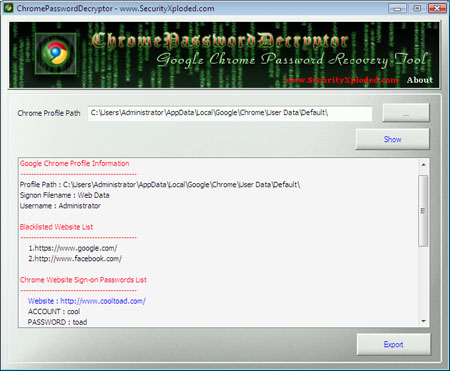
ChromePasswordDecryptor loads the secrets from logins table and then decrypts the password for each of the websites stored by Chrome. For more information on decrypting the Chrome login passwords read the article on ‘Exposing the Secrets of Google Chrome’
Click here to directly download the ChromePasswordDecryptor.
.
Brilliant !
Hi,
I think you should submit your tool to http://www.chromeplugins.org, the site is the no.1 resource for google chrome visits thousands of google chrome users visiting the site everyday.
I am sure you will get some valuable tips from users..
Regards,
Thanks mankerman for the link. I have put the post about ChromePasswordDecyptor on ChromePlugins site now.