Pattern based password recovery is not new concept. However it has been used very rarely in the present day programs besides its importance and improvement it brings on the performance.
It relies on the fact that each of us remembers some part of the password even though we have forgotten the password. This can be any parameters such as length, first few letters, end letters or middle part of the password.Also many of us have habits of choosing all of our passwords of particular pattern. When the person possess certain information about the password, it greatly reduces the time required to recover such a password.
Now the new FireMaster 2.5 introduces this technique which aims to recover the most complex or impossible looking passwords in very realistic time frame and also brings down the recovery time significantly.
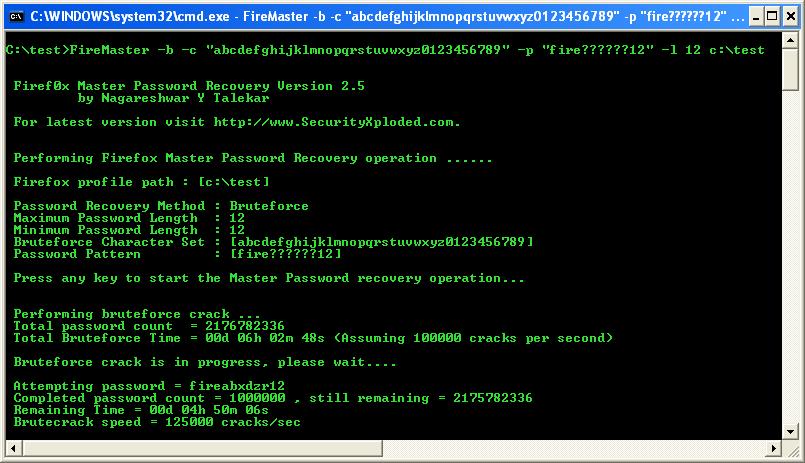
To demonstrate this practically, lets take a example of password with 12 letters containing only lower case alphabets and numbers. Recovering such a password with brute force approach will take months together even on high end machines.
Now assume that certain information about this lost password is available, say for example password is of length 12, begins with ‘fire’ and ends with ’12′.
In this case, running FireMaster using brute force method coupled with new pattern based recovery technique, this impossible looking password can be recovered in just 6 hours….!!!
Isn’t that cool ???
Best result comes when both the tool and the person’s brain are running at their top potential…!
– Nagareshwar
.
Tweet


thanks for your information …but i have some question to you,what you mean about firefox_profile_path??i hope you explaint to me,,thanks before..(physickers@gmail.com).i will be wait your email
hi,,nagareshwar..
i have recieve your email and i want thanks for you before.
in my firefox,C:\Documents and Settings\\Application
Data\(in here i dont see any file)…
by theway,,i read from magazine about fire password will delete by microsoft,didnt he??.
—– physickers—
indonesia
peace be with you
um, it didn’t work for me. I set my master password as “password” and tried brute force w/ either character set or pattern matching switches & neither worked on firefox version 3.5.6 on Windows 7 64 bit:
C:\FireMaster_bin>firemaster -b -p “passwo?d” -l 8 “C:\Users\Andy\AppData\Roaming\Mozilla\Firefox\Profiles\asdfasdf.default”
Firef0x Master Password Recovery Version 3.5
by Nagareshwar Y Talekar
For latest version visit http://www.SecurityXploded.com.
Performing Firefox Master Password Recovery operation ……
Firefox profile path : [C:\Users\Andy\AppData\Roaming\Mozilla\Firefox\Profiles\asdfadsf.default]
Password Recovery Method : Bruteforce
Maximum Password Length : 8
Minimum Password Length : 8
Bruteforce Character Set : [abcdefghijklmnopqrstuvwxyz*@#!$123]
Password Pattern : [passwo?d]
Press any key to start the Master Password recovery operation..
Performing bruteforce crack …
Total password count = 34
Total Bruteforce Time = 00d 00h 00m 01s (Assuming 100000 cracks per second)
Press any key to continue the BruteCr@cK…
1 = Attempting passwoad
, try better options
2 = Attempting passwobd
3 = Attempting passwocd
4 = Attempting passwodd
5 = Attempting passwoed
6 = Attempting passwofd
7 = Attempting passwogd
8 = Attempting passwohd
9 = Attempting passwoid
10 = Attempting passwojd
11 = Attempting passwokd
12 = Attempting passwold
13 = Attempting passwomd
14 = Attempting passwond
15 = Attempting passwood
16 = Attempting passwopd
17 = Attempting passwoqd
18 = Attempting password
19 = Attempting passwosd
20 = Attempting passwotd
21 = Attempting passwoud
22 = Attempting passwovd
23 = Attempting passwowd
24 = Attempting passwoxd
25 = Attempting passwoyd
26 = Attempting passwozd
27 = Attempting passwo*d
28 = Attempting passwo@d
29 = Attempting passwo#d
30 = Attempting passwo!d
31 = Attempting passwo$d
32 = Attempting passwo1d
33 = Attempting passwo2d
34 = Attempting passwo3d
Password not found
Just now I have tried with Firefox latest version 3.5.7 and FireMaster 3.5 and it is working great…!
I guess you have set the wrong password, may be you have set it like passw0rd (number 0 instead of letter o) and you are trying to get it right for “password” (note the letter o instead of number 0).
use the -c option to override the default character set (abcdefghijklmnopqrstuvwxyz*@#!$123) which does not include number 0 .
Good luck
[...] Brute force to recover the master password from the Firefox key database file. Now it also supports “patten based password recovery mechanism” which significantly reduces the time taken to recover the [...]
Why isn’t there an option to use the default ascii character set? I want to test my firefox master password and I want FireMaster to just use every toll possible, in order of greatest probability or fastest implementation. Common passwords first, Dictionary attack second, dictionary + numbers characters, common substitutions (l33t sp33k), then brute force.
Is this possible? Is even a complete character set possible, or do you actually have to provide every ascii character in the -c option?
We will have it soon. Mostly in GUI version which will be quicker and easier to use !
awesome thing
but is it possible to disable upper-/lowercase in the pattern?
and ist there a *-pattern. so if i only remember the beginning and the end of the password and don’t know which and how much characters where in the middle i can type -c “pas*rd” (if the password is “password”)?
smf15
Yes, Firemaster already support pattern based password recovery, look here for more
http://nagareshwar.securityxploded.com/2008/03/31/firemaster-with-pattern-based-password-recovery/
Nice but how to use the -c option with special chars also the ” cause it is in the code detected as closed tag so if itry ing -c “1234567890!”§$%&/()=?”
the last things are not recognized cuase ther is after the ! one ” end alll after §$%&/()=?
are not used but i need the f***ing ”
can any one help???
use the single quote -c ’1234567890!”§$%&/()=?’