
Finally I am happy to write this post on the mega version of RemoteDLL.
It took me around 5 years to bring this new version of RemoteDLL with all those envisioned features. I was more excited when it worked just right on Windows 8 inspite of changes around DLL structure, thanks to cut back mechanism used in ‘Free Dll’ operation.
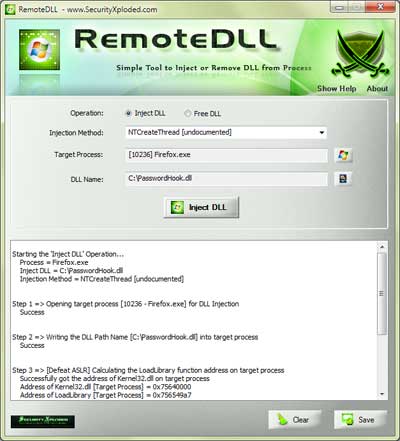
This new version of RemoteDLL brings up the brand new attractive and simple user interface with great new features
- Inject DLL into Remote Process even across Session boundaries
- Remove DLL from Remote Process completely.
- Supports multiple Injection methods including CreateRemoteThread, NTCreateThread, QueueUserAPC
- Works with ASLR (Address Space Layout Randomization) by dynamically calculating addresses.
- Advanced Process List with detailed process information like PID, Session, ASLR, DEP, Username etc.
- Fully Portable. Also comes with Installer for local installation/un-installation.
- Works on all Windows systems starting from Windows 2K to Windows 8
And support for 64 bit version will have to wait for few more days :(. We wanted to bring it out this time but it requires some major changes and we don’t want to hurry up.
With that we would like to Thank all those individuals who had sent valuable feedbacks for this mega version.
Check it out yourself – RemoteDLL v2.0
No Comments Yet